AI in Development: 30-60% Acceleration — Reality or Hype?
Hands-on experience with AI tools and LLM agents in enterprise development and pet projects. Where AI actually speeds things up, where it creates illusions, and how to integrate it into your workflow.
The February Experiment
February 2025. A video call at DION, screen shared — my tech lead is writing a Flink job for a new transaction processing pipeline. A corporate AI assistant is open in the next tab. He describes the task, gets the code, copies it into the IDE. Twenty minutes later, he has a working skeleton of a streaming pipeline — mappings, aggregation windows, watermark strategy. This usually takes half a day.
I look at the result and think: okay, impressive. Then I notice the generated code uses ProcessingTime instead of EventTime. For our system, where delays between sources can reach minutes, that’s a disaster. The AI doesn’t know we have heterogeneous data sources with different latency profiles. It produced technically valid code that would have scrambled events across time windows in production.
That moment set the tone for our entire approach to AI as a team. Not “hooray, acceleration!” and not “garbage, doesn’t work.” But a sober question: where’s the line between real acceleration and the illusion of it?
Context: Decision Engine and 20 TB per Day
I lead a development cluster building VTB’s pre-approved personalized credit offers platform — a Real-Time and Batch Decision Engine. Processing 20 TB of data per day, 500K RPS in production, generating offers across all credit products for the bank’s entire client base in real time. Stack: Flink, Kafka, Tarantool, Scala, Python.
And here — the classic enterprise Big Data problem. Scope underestimated at the start. Every sprint uncovers new dependencies. Requirements change faster than the team can implement the previous ones. Integrations with dozens of banking systems, Central Bank regulatory constraints, legacy contracts.
When AI tools matured to a “production-code-ready” level in late 2024, we launched an experiment. Not by decree — “everyone now uses the AI assistant” — that’s a recipe for chaos. As a pilot instead. Analysts first — they have the most formalized tasks. After a month, we showed the results to the team. Then developers. Then testers.
Six months in, I had the numbers. Not from a lab — from the task tracker, from real sprints.
Where the Money Is
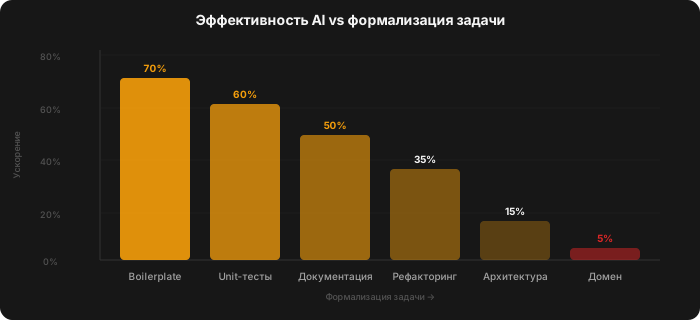
Boilerplate and template code — this is where AI is an absolute beast. CRUD, DTO mappings, service configurations, DB migrations. Scaffolding a new microservice with a REST API, validation, error handling, and logging used to take 2-3 hours. Now — 30-40 minutes, including review. A 70-80% saving, and review quality doesn’t suffer because validating template code is a mechanical task.
Refactoring — 50-60%. Migrating components between framework versions, renaming with dependency tracking, switching patterns. AI keeps the context of the entire project and doesn’t miss imports in distant files. Days of grind compressed into half a day.
Tests — 60-70%. And here’s the unexpected bonus: AI methodically churns through edge cases you didn’t think of. Null values, empty collections, maximum sizes, concurrency scenarios. Coverage grows 3-4x faster. But — and this matters — you define the testing strategy. What to test, at what level, which invariants. AI generates, you think.
Documentation — 50-60%. A draft from structured notes is generated in minutes. The analyst edits instead of starting from a blank page. Formalizing requirements from meeting notes — a skeleton of user stories with acceptance criteria is ready before you finish your coffee.
Data analysis for analysts — the earliest and most visible effect. Feed an LLM a database export, ask it to find anomalies — faster than writing SQL for each hypothesis. Two hours of manual analysis becomes twenty minutes of validation.
Where AI Creates Illusions
Architectural decisions. AI will suggest five options — all technically correct. But the choice depends on things that don’t fit in a prompt: organizational politics, competencies of specific people on the team, product roadmap for two years ahead, central bank regulatory constraints, legacy systems with backward compatibility. The speedup is 10-20%, and even that comes from generating options for discussion, not from making the decisions.
Debugging distributed systems. Race conditions, cascading failures, intermittent issues under load. We had a case: a streaming pipeline was losing events under a specific load pattern. AI could see the code but couldn’t see the Grafana dashboards, didn’t understand the load patterns, didn’t know that this particular Kafka topic switches to a different broker during rebalancing. Diagnosing problems like these is detective work, and AI is an assistant in it, not the detective.
Code review of business logic. AI catches null pointer exceptions, suboptimal queries, style issues. But it misses errors in business processes. It doesn’t know that Premium-tier customers get a different discount calculation unless it’s explicitly described. It doesn’t know that status = 3 means “client under manual review due to sanctions restrictions.” Domain knowledge is still on the human side.
The Matrix: What Goes Where
| Task Type | Time Saved | AI Output Quality | Control Level |
|---|---|---|---|
| Boilerplate, CRUD | 70-80% | High | Minimal |
| Tests, automation | 60-70% | Medium-high | Medium |
| Documentation | 50-60% | Medium | Medium |
| Refactoring | 50-60% | High | Medium |
| Prototyping | 40-50% | Medium | High |
| Domain business logic | 20-30% | Low-medium | Mandatory |
| Architecture | 10-20% | Low-medium | Mandatory |
| Debugging complex systems | 10-15% | Low | Mandatory |
The pattern is obvious: the more formalized the task, the higher the AI impact. The more implicit context required — the lower.
How We Rolled It Out (No Slogans)
We started with analysts. Collected working prompts in our knowledge base — “how to generate test cases,” “how to write documentation,” “how to do code review.” No need for everyone to reinvent the wheel.
We introduced a double-check rule: every AI output goes through human review. No exceptions. This isn’t bureaucracy — it’s hygiene. After the ProcessingTime vs EventTime incident, nobody argued.
We measured the impact honestly. Not “we feel like it’s faster,” but velocity comparison across sprints before and after. First month — zero improvement. People were spending time learning the tools, prompts were clunky, AI outputs had to be rewritten. Second month — growth began. Third — we hit a plateau. By month four, we had a library of prompts and patterns that genuinely saved time. The adoption curve is a classic J-shape: worse at first, then significantly better.
A separate story — resistance. Two developers flatly refused AI tools. One — on the grounds of “I write code fast enough already.” The other — out of quality concerns. We didn’t push. After two months, the first one noticed a colleague with AI closing tasks noticeably faster and came around on his own. The second never did — and that’s his right. Forcing people to change tools is a path to sabotage.
Security by default. In a banking project, you can’t send real data to external services. Local models for code, anonymized data for external APIs. This limits capabilities, but there’s no alternative. We spent a separate sprint setting up the environment: local endpoints, anonymized test data, rules for prompts that contain no confidential information. Boring work, but without it the experiment would have ended with a call from the security department.
Context is everything. Project rule files, code examples, domain model descriptions — all of this dramatically improves generation quality. AI without context is a random generator of technically valid but useless code. AI with context is a junior who has read all the documentation and remembers it better than you.
Pet Project as a Litmus Test
Alongside enterprise, I use the same tools on my own full-stack project. And here’s what’s interesting: the acceleration is even more noticeable on a pet project. Not because the tasks are simpler — because there are no organizational constraints. No compliance, no approvals, no data anonymization.
A working MVP in timescales that are incomparable to traditional development. Specific example: I needed to build a complex integration of several external APIs with caching, error handling, retry logic, and rate limiting. In a previous life — a week of work minimum: study each API’s documentation, write adapters, cover with tests, debug edge cases. With AI — two evenings. I described the contracts, described error behavior, described the caching strategy. AI generated code. I reviewed, corrected, ran it. The most interesting part: AI found an edge case in one API’s documentation that I would have missed — a mismatch between the date format description and the actual response. The machine read the docs more carefully than the human. But — and this matters — it didn’t know why I needed this integration or which data was critical. Only I knew that.
But — and this is the key thing — all decisions about what to build, for whom, and which problem to solve were mine. AI dramatically accelerates execution but doesn’t replace product thinking. I also designed the pet project’s architecture myself, drawing on enterprise systems experience. AI suggested options, but the final call was human.
Which Models I Compared (at the Time of the Talk, 2024)
As part of my pet projects, I tested several models on real tasks — from code generation to creating an educational course.
ChatGPT (GPT-4, later GPT-4o) — the leader at the time. I used it to build a complete System Analysis course for T1 Digital Academy: structure, materials, assignments, evaluation criteria. No other model could handle a task of that scale at the time.
GigaChat (Sber) — I gave it a fair try on similar tasks. It performed acceptably on code generation and simple texts, but on complex tasks — course creation, architectural analysis — the results were significantly weaker. The model couldn’t hold context across long sessions and lost the thread of reasoning. This isn’t a verdict — Russian models are developing rapidly, and the situation is already different by 2026. But at the time of the talk, the gap was substantial.
Gemini (Google, then Bard → Gemini Pro) — strong in analytics and data tasks, but lagged behind GPT-4 in enterprise code generation. Worked well for research tasks.
Grok (xAI) — an interesting tool for quick answers and brainstorming, but for serious code generation and long sessions it didn’t quite measure up at that point.
The takeaway is simple: for enterprise tasks in 2024, ChatGPT (GPT-4/4o) was the primary working tool. Corporate AI assistants available within the security perimeter covered basic use cases, but complex tasks required external models on anonymized data. The landscape is changing fast — and that’s good for everyone.
A Multiplier, Not a Replacement
The formula we arrived at after six months of experiments: AI is a multiplier. It multiplies the effectiveness of a qualified specialist. A good developer with AI is an excellent developer with a turbocharger. A bad developer with AI is a bad developer who now generates bugs faster.
30-60% acceleration is not a marketing number. It’s a range from the task tracker over six months. The lower end — on tasks with heavy domain context. The upper end — on formalized routine. The average across the board — around 40%.
But here’s what concerns me. The tools are evolving faster than teams are learning to use them. Prompt quality across my team is still uneven. Some people squeeze maximum value from AI, others continue using it as autocomplete on steroids. The productivity gap between these groups is growing. And this is a new kind of inequality that few people are thinking about yet.
A year from now, these numbers will be different. The barrier to entry will drop, tools will get smarter, context windows will grow. But the principle will remain: AI accelerates execution, not thinking. And the deeper your domain expertise, the more you’ll extract from it. If you don’t have that expertise — it will bury you faster than you’ll notice.
The most important thing I learned in these six months: AI doesn’t level the playing field. It amplifies the gap. A strong engineer becomes even stronger. An experienced analyst tackles tasks that used to be beyond one person. And those who don’t understand what they’re generating get beautiful code that breaks in production. And fixing it falls to those same strong engineers, who are already overloaded.
Based on a talk at AiUP 2024 and hands-on experience integrating AI into enterprise development.
— Vladimir Lovtsov
Stay Updated
New articles, talks, and projects — no spam, only substance.
No spam. Unsubscribe anytime.
Related Articles
AI in Development: 30-60% Acceleration — Reality or Hype?
Hands-on experience with AI tools and LLM agents in enterprise development and pet projects. Where AI actually speeds things up, where it creates illusions, and how to integrate it into your workflow.
API From A to Z: Theory and Practice
API horror stories from banking development, protocol comparison, and mistakes I've seen in every other specification. Material from a systems analysis course.
How to Move a Banking Product to Real-Time
Building a real-time pre-approved offers system in banking enterprise. Apache Flink, Tarantool, Kafka — and the lessons you won't find in the docs.